

A CMS is a content management system — software that lets you add and edit your website's text, products, prices and images yourself, without opening the code or booking a developer. Without one, every edit is a ticket for a programmer; with one, it is five minutes in a form.
Below: the three types that exist, the real difference between boxed WordPress and a headless system, and when your site does not need a CMS at all. If you are after the interface rather than the concept — what the admin area looks like and what you can click by mistake — we cover that in how a website admin panel works.
What a CMS is, in plain words
A site without a CMS is a menu printed at a print shop: the price of coffee changes and you redo the layout, print it and deliver it. A site with a CMS is the same sign with a field where a manager types the new price.
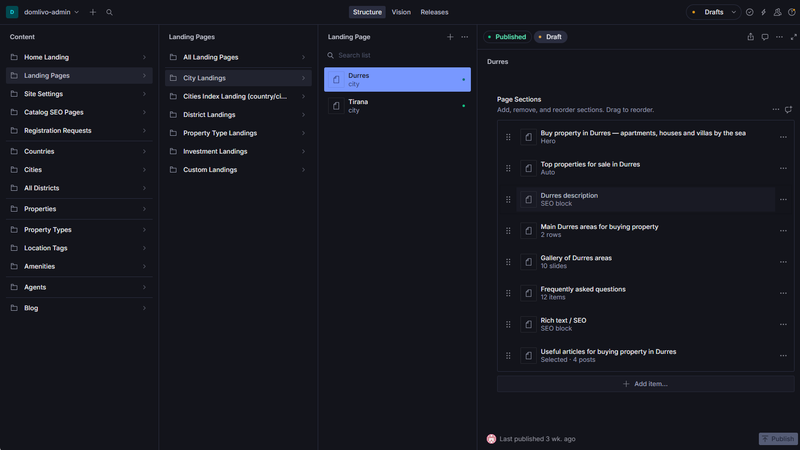
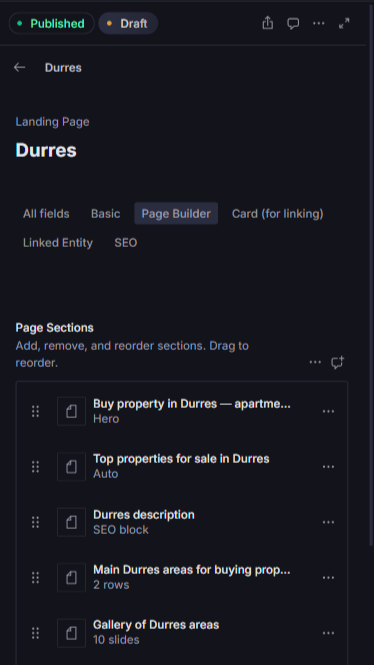
Technically a CMS does one thing: it separates content from presentation. Text, photos and prices live in a database; the template knows how to display them. That is why, in a properly set up system, an editor cannot accidentally break the design — they have no access to the part that draws the page.
What every CMS is made of
- Content store — the database holding articles, services, products and translations.
- Editor — fields and a Publish button. What people usually call the admin panel.
- Delivery layer — the part that turns stored content into a finished page for the visitor.
In boxed systems all three live inside one application. In headless systems the delivery layer is separate and content reaches the site through an API. Every advantage and drawback of the approach follows from that.
Three types of CMS: boxed, headless, builders
Choosing a CMS is really choosing between three models, not thirty brand names. Here is how they look to a business owner rather than a developer.
| Type | Who it suits | Strengths | Risks |
|---|---|---|---|
| Boxed: WordPress, OpenCart | A blog, a small shop, a budget under £1,000 | Cheap to start, thousands of themes and plugins, easy to find someone to work on it | Plugins conflict, updates go unapplied, speed decays over the years, the most common target for hacks |
| Headless: Sanity, Strapi | A growing business: several languages, a catalogue, integrations, an app | Content separate from code, one content set for site and app, stays fast, editors cannot break the layout | Needs a developer at launch, no five-minute plugin route |
| Builders: Tilda, Wix | Testing an idea, a landing page, an event, a portfolio | Live in a weekend, nothing to administer, predictable monthly fee | You are a tenant: the subscription never ends, SEO and speed are capped, moving out means a rebuild |
The cost of getting this wrong is not the launch budget — it is the cost of leaving. A builder site is not migrated, it is rebuilt, and the same goes for a WordPress install carrying thirty plugins. We compare the approaches in Next.js versus WordPress and website builders.
Why we build on headless Sanity
Not a fashion choice: the headless model removes most of the reasons clients bring us someone else's website to rescue.
- Content sits apart from code. Editors work with fields named Title, Price and Photo, not layout blocks. Breaking the page grid from the admin area is impossible — the buttons for it do not exist.
- One content set, several channels. The same service description feeds the website, the app and the newsletter. Nothing to update in three places, nothing to drift out of sync.
- The site stays fast. Pages are built ahead of time and served as static files, so the CMS plays no part in a visitor's page load — unlike WordPress, which assembles the page on every request.
- Multilingual content stays aligned. Ukrainian and English are fields on the same document, so you cannot update a price in one language and forget the other.
There is a trade-off, and we state it plainly: headless needs a developer at launch — you will not set it up yourself in an evening. That is why it comes with the projects we build rather than being sold as a box.
Does your site need a CMS at all?
Honestly, not always. For a single-offer landing page a CMS usually costs more than it saves — the copy changes once a quarter, and the system adds one more moving part to keep updated. A landing page from £800 normally ships without an admin area.
You need a CMS when content is alive: news, a blog, a catalogue, prices, vacancies, several languages, several people with access. On our projects from £3,500 it is part of the package, including a corporate website from £3,500 — never a separate line item.
Four mistakes that get expensive
- A plugin for every task. Thirty plugins means thirty other people's codebases inside your website. Any of them can break, slow the site down or open a hole — and half were installed to try something and never removed.
- Nobody applies updates. The site launches, the contractor moves on, the version stays where it was. A year later it is an open door: hacked WordPress sites in 2026 are almost always an outdated core or plugin.
- Only the agency holds the access. Domain, hosting and admin login all registered to the contractor. Fine while the relationship lasts; when it ends you discover the site is not yours. Administrative access belongs in your inbox from day one.
- Editors with admin rights. A content manager does not need permission to install plugins or edit templates. Splitting the roles takes five minutes at launch and saves one emergency evening a year.
The short version: a CMS is not the website and not the design — it is how you manage what is on it. The useful question is not which CMS is best, but how much of your content actually changes and who will be changing it.