
What it is and why it's worth a look
Google Search Console is a free dashboard where Google shows which queries surfaced your site, what people clicked, and what's blocking indexing. Unlike contractor promises, these numbers can't be dressed up: it's Google's own view. If it's not connected yet, that's the first thing to do after reading this.
The four metrics that explain everything
Impressions. How many times your site appeared in results. Growing impressions mean Google finds you relevant to a wider set of queries.
Average position. Where exactly you appear. 1–10 is page one, 11–20 page two. Position 35 means "you're shown where nobody looks".
Clicks. How many people actually visited. That's your search traffic.
CTR. The share of viewers who clicked. A low CTR at a good position is a cue to rewrite the page's title and description.
"Impressions but no clicks": the diagnosis that matters most
The most common small-business picture: hundreds of impressions, zero clicks. It means Google already considers you an answer — but shows you on page 2–4, where nobody scrolls. That's not a verdict; it's the cheapest growth point there is: content and authority lift what already "almost works". It's worse when there are no impressions at all — then the page for that query simply doesn't exist.
Three reports for an owner: 10 minutes a month
- "Queries" — what people search to find you. Look for queries with impressions and no clicks: that's your content list
- "Pages" — which pages bring traffic. One page collecting everything? The rest aren't working
- "Indexing" — how many pages Google can even see. Lingering errors here are a message to your developer
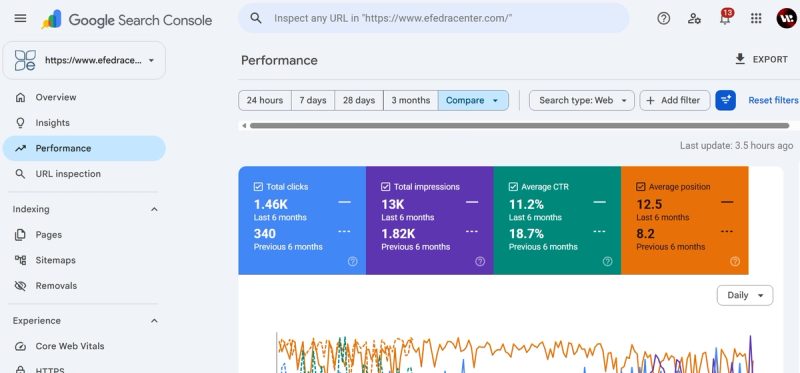
What it looks like in real life: Efedra
An Odesa clinic: half a year ago — 340 visits over 6 months, 1,820 impressions. After a site rebuild and content work — 1,460 visits and 13,000 impressions. In Search Console you can watch the path week by week: impressions rose first, then positions, then clicks. That's exactly the order SEO works in — more in our medical SEO breakdown.

What to do with the data
- Impressions without clicks → strengthen the page or write an article for the query
- Good position, low CTR → rewrite the title and description
- No impressions for a key query → create a page for it
- Indexing errors → developer territory